Order tickets: kitchen and bar printers per zone
In hospitality, each menu category says in which zone it is prepared (kitchen, bar, desserts…) and each zone can have its order printer. When «Send to kitchen» is pressed (or when charging what had not been sent yet), what is new for each zone comes out on its printer, in large type, with the table or the pager, the time, the waiter, the guests and the notes; what was cancelled comes out separately. They are ESC/POS commands for 80 mm thermal printers, printed by the bridge on that printer's computer (installed in Windows or a network one by IP). If that computer is off, the order ticket waits in the queue and comes out when it is back. Each printer numbers its order tickets of the day.

▶ In motion: order tickets: kitchen and bar printers per zone, point by point.
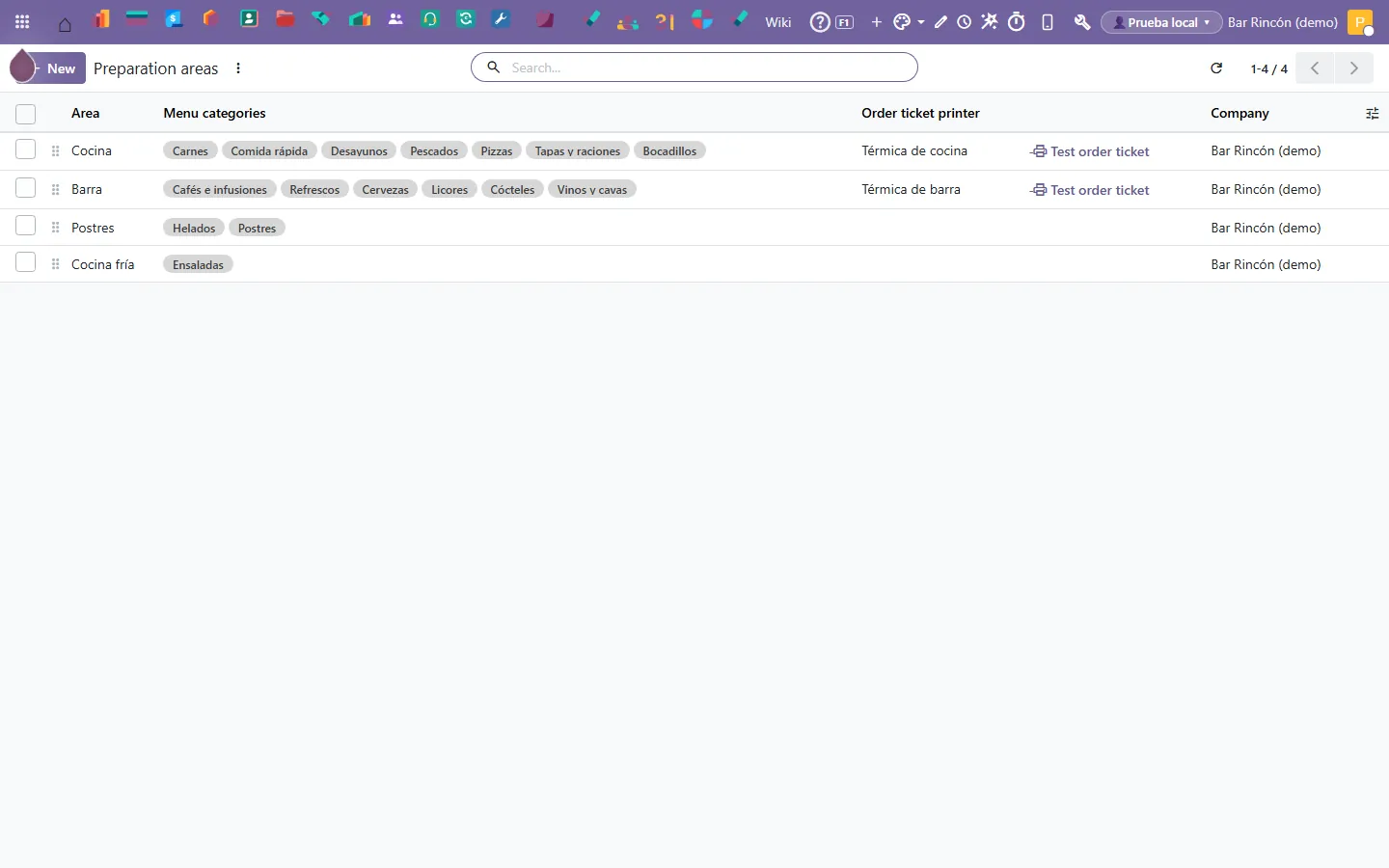
- 1Each zone with the categories prepared in it (set in Menu categories).
- 2The zone's order printer and how many copies come out (1 to 5). Empty: kitchen screen only.
- 3A test order ticket to that zone's printer.
- 4The printed order ticket: the zone, the table or the pager, the time, the waiter, the guests and, below, what was ordered with its notes.
How it is done
- Add each order printer in Documents › Direct printing › Printers: the kitchen one and the bar one, each on its computer, or a network one by IP (tcp://192.168.1.60:9100).
- Open Hospitality and POS › Configuration › Preparation areas and create the zones: Kitchen, Bar, Desserts…
- On each zone choose its «Order ticket printer» and, if needed, the copies; without a printer, the zone only uses the kitchen screen.
- Press «Test order ticket» on the zone's row.
- In Hospitality and POS › Menu › Menu categories, give each category its «Preparation area».
- In the POS, open a table, add something from each zone and press «Send to kitchen»: one order ticket per zone comes out.
There are no comments for now.
to be the first to leave a comment.