What it is and its two variants
The GestioERP desktop application for Windows 10 or 11: it opens your GERP ODOO in its own window and the POS in full screen with the «TPV» card, prints without dialogs through the print bridge it carries inside and, if the internet goes down, the till PC acts as the local server for the POS. There are two variants: the standard one and the POS one.
Video course with Ximena and Marc
Press «Empezar» (Start) and turn the volume up: they show you with voice-over and subtitles (in Spanish), in about 3 minutes.
Open full screen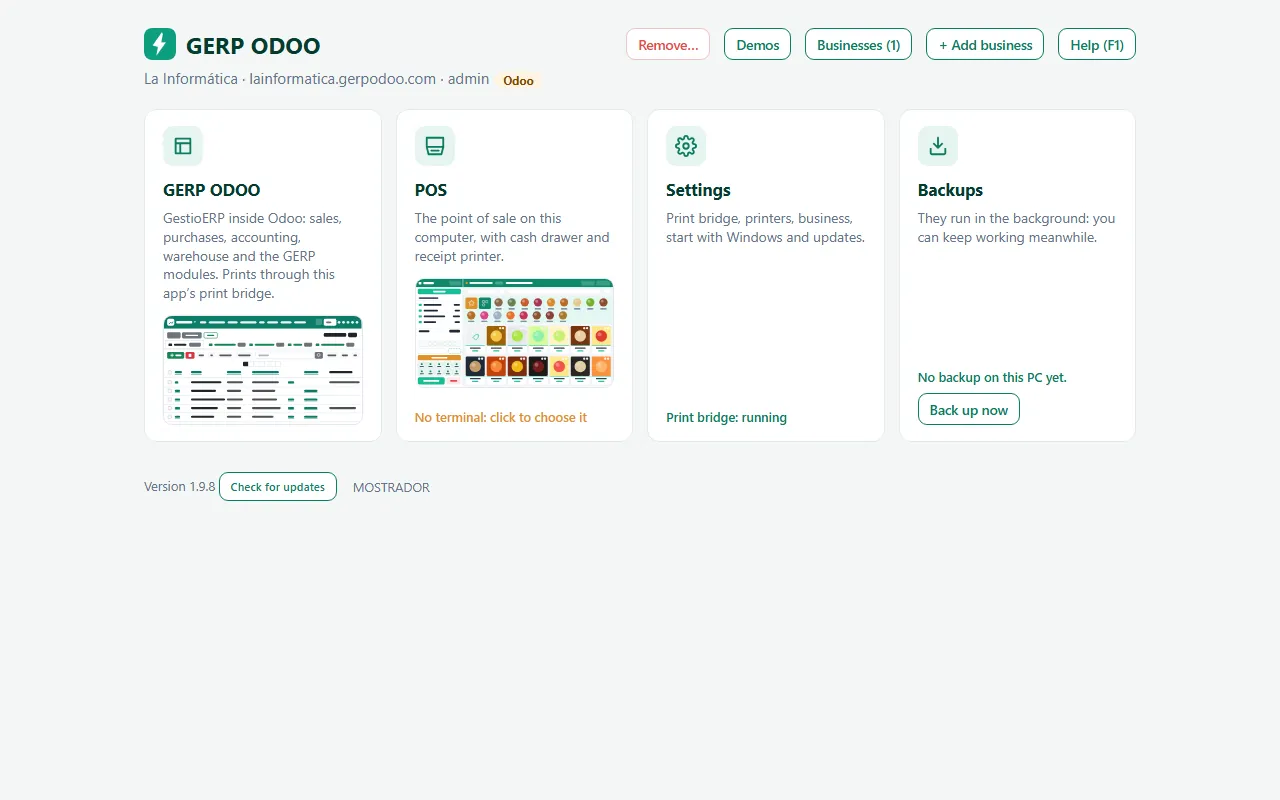
GestioERP for Windows is a desktop application that opens your GERP ODOO in its own window, without a browser, and carries the print bridge (Print Bridge) inside: whatever you send to print from GERP ODOO comes out on that computer's printers without opening the PDF. There are two variants with the same program inside: «GestioERP for Windows», with everything (GERP ODOO, the POS, the settings and the backups), and «GestioERP POS for Windows», meant for the till or bar computer, which starts straight in the POS in full screen.

▶ In motion: what it is and its two variants, point by point.
- 1At the top, the open business with its address and your user; «Businesses» switches between them and «+ Add business» adds another one.
- 2The GERP ODOO card opens the whole program inside the application, with the session kept on this PC.
- 3The POS card shows up if your GERP ODOO has the POS installed: it opens it in full screen.
- 4Settings: the print bridge and its printers, the business, the language, starting with Windows and the updates.
- 5Backups of your GERP ODOO on this PC (the backup module is needed on the server).
- 6At the bottom, whether the print bridge is running, the version and «Check for updates».
How it is done
- For the office, install «GestioERP for Windows»: GERP ODOO, the POS, the settings and the backups.
- For the till or bar computer, «GestioERP POS for Windows»: it starts straight in the POS.
- Both carry the same print bridge: one per computer is enough.
There are no comments for now.
to be the first to leave a comment.