GERP ODOO Course
Completed
Email marketing
Email campaigns to contact lists, with opens and clicks.
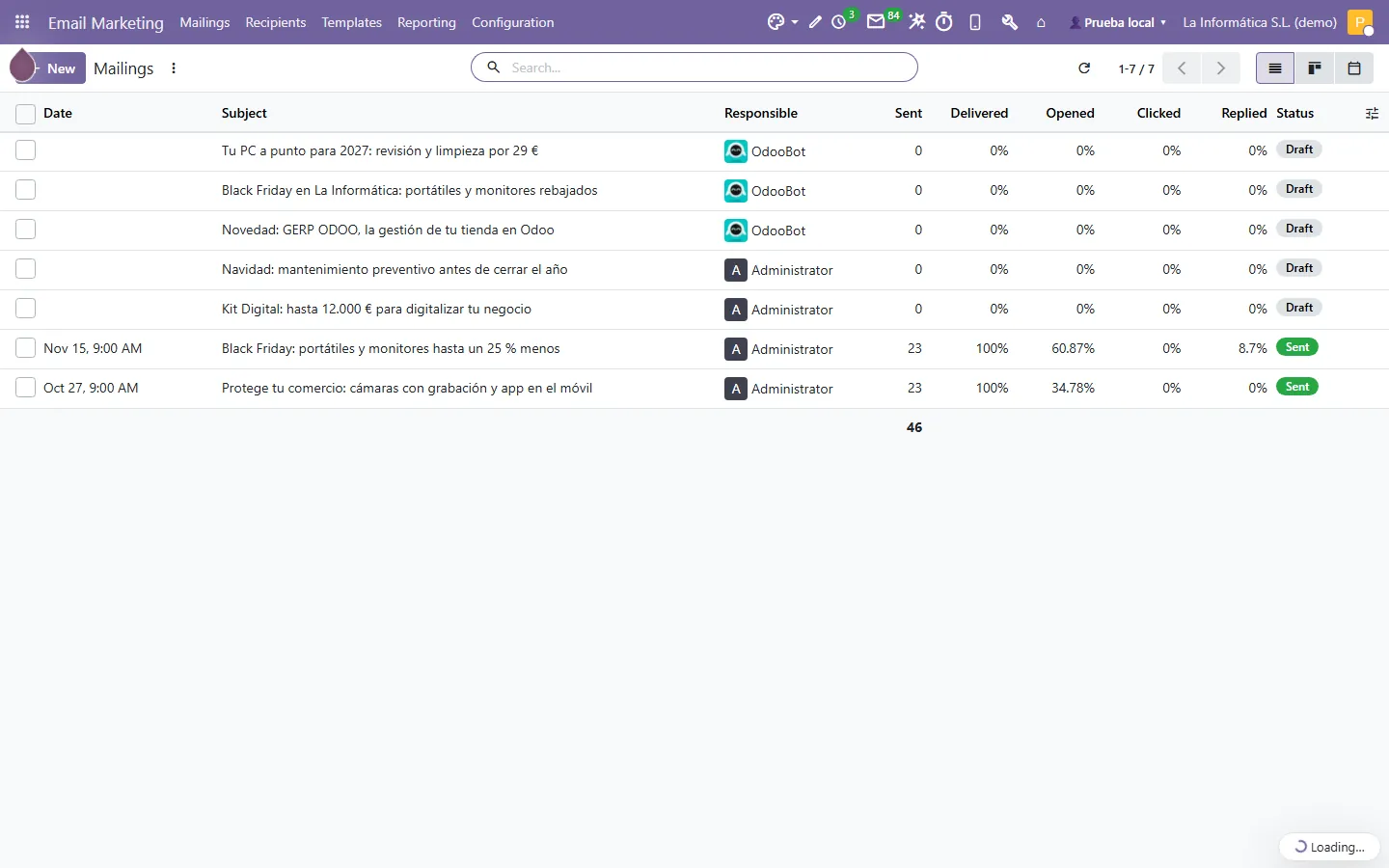
1. A campaign
Choose the list, design the email and send it or schedule it.
2. The email lists
Marketing › Lists.
3. The email design
Block editor.
4. Schedule a shipment
«Schedule».
5. The campaign statistics
Sent, opened, clicks.
6. The sick leaves
Unsubscribes.
7. Send a test
«Test».
8. The marketing contacts
Import from Excel.
Frequently asked questions
How do I send an email campaign?
Home › Marketing › New: subject, list, design and «Send».
How do I create a mailing list?
Marketing › Lists.
How do I design the email?
Block editor.
How do I send tomorrow?
«Schedule».
How do I see who opened?
Sent, opened, clicks.
How do I see unsubscribes?
Unsubscribes.
How do I send myself a test?
«Test».
How do I import contacts?
Import from Excel.
Why can't I see Marketing por correo?
If you can't see it, your internal user lacks the «marketing.correo» permission: the administrator grants it in Home › Internal users.
Email campaigns to contact lists, with opens and clicks.
There are no comments for now.